









































What Is a Warehouse Management System (WMS)? Types, Cost and How to Choose



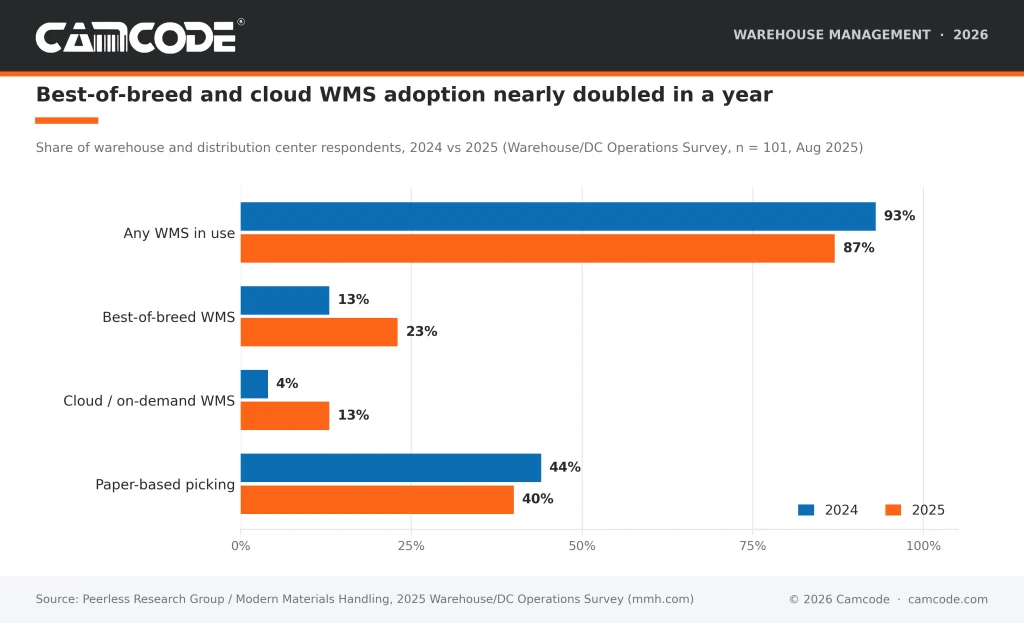
87% of warehouses and distribution centers run a warehouse management system, according to the 2025 Warehouse/DC Operations Survey from Peerless Research Group and Modern Materials Handling. A warehouse management system (WMS) is the software that runs warehouse management: it tracks inventory by location and directs receiving, put-away, picking, packing and shipping. A WMS runs as standalone software, a cloud subscription or an ERP module, and it reads barcode or RFID labels to keep the physical warehouse and the digital record in sync.
CAMCODE
Answer five questions to get a WMS type, a first-year budget range and a realistic implementation timeline.
1. Orders shipped per day (at peak)
2. Active SKUs
3. Warehouses or distribution centers
4. Systems you run today
5. Equipment on the floor
Answer all five questions to see your match.
Your closest fit
First-year budget
Typical timeline
Deployment
Answers 1, 2, 3 and 5 are summed into an operation size score (4 to 15). Scores of 4 to 6 map to a small cloud WMS, 7 to 10 to mid-market, 11 and above to enterprise. Answer 4 overrides the vendor family: a 3PL always gets a 3PL WMS edition. An SAP or Oracle shop is pointed to that vendor’s WMS or a Tier 1 best-of-breed system. A cloud ERP shop is pointed to its ERP’s WMS module or a connected cloud WMS. Budget bands are CPCON Group’s 2026 first-year ranges. Timelines follow Aptean’s 4 to 6 month standard, shortened for small cloud deployments and lengthened for automation-heavy enterprise projects. The tool stores nothing and sends nothing.
A warehouse management system (WMS) is the software that runs warehouse management. It tracks warehouse inventory by storage location and directs every warehouse operation, from receiving and put-away to picking, packing and shipping, by scanning the barcode or RFID label on each rack, bin, pallet and item.
The WMS holds a live record of every SKU in every storage location and uses it to run daily warehouse operations: it tells a receiver where to put a pallet, tells a picker which slot to walk to and confirms each move with a scan. That is what separates a WMS from plain inventory tracking software, which records quantities but does not direct the work. A WMS can be a standalone application, a cloud subscription or a module of an enterprise resource planning (ERP) suite such as SAP, Oracle or NetSuite; TechTarget's definition covers the same ground. Whichever form it takes, the system is only as accurate as the labels it scans, which is why location labeling is the first task on any WMS project.
A warehouse management system works by turning each warehouse operation into a scan. The WMS receives inbound goods, assigns a storage location, tracks warehouse inventory by location, builds and sequences pick lists, verifies packing and prints shipping labels. A worker confirms every step by scanning a location label or item barcode, so the warehouse management record always matches the floor. The cycle follows the six core warehouse operations:
Every step depends on durable location labels and item barcodes; a scan the WMS cannot read is a transaction it cannot record. Our guide to barcode systems for warehouses covers how the labels, printers, scanners and WMS fit together.
The benefits of a warehouse management system are higher inventory accuracy, fewer picking errors, faster order fulfillment, better labor productivity, better use of storage space and real-time stock visibility across warehouse management. 50% of companies in the 2025 Software/Automation Outlook Survey reported WMS ROI in under one year, and 40% of warehouses were still picking from paper in 2025, which is where the first gains come from.
Warehouse managers use warehouse management systems to control and transfer inventory in a centralized system, usually from a handheld scanner or tablet on the floor. Other benefits of implementing a warehouse management system include:
Some warehouse management systems aid executives in maximizing the use of their space and their workforce.
If you choose a WMS that automates routines for stock rotation and picking, workers will require less space, which will streamline your warehouse and make it more efficient. Some of the best WMS solutions improve space utilization by reducing safety stock levels and more efficiently locating items via receiving, assembly, packing and shipping areas.
Warehouse executives who invest in warehouse management systems look for additional return on investment (ROI) opportunities as a result of their investment.
More often than not, a WMS solution delivers the ROI warehouse executives and managers expect to see because the program provides the visibility and transparency needed to better manage inventory and reduce safety stock levels; knowing real-time inventory levels leads to reduced lost product and overstocks.

Warehouse Management Systems (WMS) offer a wide range of functionalities that streamline and optimize warehouse operations. Here are some key features and functionalities of a modern WMS:
Order picking is a crucial function of WMS that ensures the accurate and efficient collection of items for customer orders. Advanced WMS solutions use technologies such as barcode scanning, voice picking, and pick-to-light systems to guide workers to the correct locations within the warehouse.
These systems significantly reduce errors and improve picking speed, enhancing overall order fulfillment efficiency.
WMS also plays a vital role in the packing and shipping process. Once items are picked, the WMS generates packing lists and shipping labels, ensuring that each order is correctly packaged and labeled for dispatch.
This automation reduces the likelihood of errors and accelerates the shipping process, leading to faster delivery times and improved customer satisfaction.
One of the most powerful features of WMS is real-time inventory tracking. By using RFID, barcode scanning, and IoT sensors, WMS can provide accurate, up-to-the-minute data on inventory levels.
This visibility helps warehouse managers to track the movement of goods within the warehouse, identify discrepancies, and make informed decisions about inventory replenishment and order fulfillment.
Optimizing the physical layout of the warehouse is another key functionality of WMS. By analyzing data on item velocity, order patterns, and storage requirements, WMS can recommend optimal storage locations for different products. This optimization minimizes travel time for pickers, maximizes space utilization, and enhances overall warehouse efficiency.
Modern WMS use AI and robotics to automate various warehouse tasks. AI algorithms can predict demand, optimize inventory levels and improve labor scheduling. Robotics, such as Automated Guided Vehicles (AGVs) and Autonomous Mobile Robots (AMRs), are used to transport goods within the warehouse, reducing the need for manual labor and increasing operational efficiency.
These technologies not only enhance productivity but also improve workplace safety by taking over repetitive and physically demanding tasks.
Deloitte's supply chain technology fellow described the shift in the 2026 MHI Annual Industry Report:
“The report's findings emphatically indicate that AI is shifting supply chains from static, schedule-driven execution to much more dynamic, real-time orchestration.”
Wanda Johnson, Supply Chain Technology Fellow, Deloitte Consulting. MHI Solutions, June 2026 (2026 MHI Annual Industry Report, 500+ supply chain leaders surveyed).
In a warehouse, that orchestration runs through the WMS, which is why AI features now sit inside the WMS itself rather than beside it.
Incorporating these advanced features into warehouse operations can lead to significant improvements in efficiency, accuracy and overall performance, making WMS an essential tool for modern supply chain management.
The four types of warehouse management systems are standalone warehouse management software, ERP module WMS, cloud-based WMS and supply chain execution (SCE) suite WMS. 3PL editions and open-source packages are variations of those four types of warehouse management system.
Two variations sit inside those four. 3PL WMS editions add multi-client inventory segregation, activity-based billing and customer portals for 3PL providers. Open-source WMS packages offer a free code base that the buyer configures and hosts, which lowers license cost and raises the internal IT effort.
Gartner's analysts put the deployment shift plainly in the 2025 Magic Quadrant for Warehouse Management Systems:
“Cloud has become the preferred WMS deployment option, with more than 80% of new customers preferring cloud if the economics are reasonable.”
Gartner, Magic Quadrant for Warehouse Management Systems (analysts Simon Tunstall, Dwight Klappich, Rishabh Narang, Federica Stufano), May 2025. Quoted by Made4net, May 2025.
For a warehouse choosing between the four types today, the practical question is no longer cloud or on-premise but which vendor's cloud edition fits the order profile.
The size of the warehouse often determines whether the organization needs a standalone system or a WMS as a module of an ERP system or supply chain management suite. Some software developers also gear their WMS systems toward the industry for which they are intended, so look for a warehouse management system that is tailored to your industry, whether it is eCommerce, retail or enterprise.
The difference between a WMS and an ERP is scope. An ERP (enterprise resource planning) system runs the whole business: finance, purchasing, sales orders, HR and manufacturing, with inventory recorded at the level of a site or a general ledger account. A WMS runs one part of that business, the warehouse, and records inventory at the level of a bin, pallet or license plate. The ERP knows that 400 units of an SKU are in the Cleveland warehouse; the WMS knows that 120 of them are in rack A-14, level 3, and directs a picker there. Most companies run both and integrate them, either through an ERP vendor's own WMS module (SAP EWM, Oracle WMS Cloud, NetSuite WMS) or through a best-of-breed WMS connected to the ERP. In the 2025 Warehouse/DC Operations Survey, 23% of respondents ran a best-of-breed WMS, up from 13% in 2024.
A WMS and an inventory management system both track stock levels, but a WMS also directs the work. Inventory management software answers how much of each item the business owns and where it sits at the site level, and it handles reorder points, purchase orders and costing. A warehouse management system answers the same question at the bin and pallet level and then tells workers what to do next: which dock door to receive at, which slot to put a pallet in, which route to walk on a pick, which carton to pack. Small operations with one location and a few hundred SKUs often start with inventory software and barcode labels; once daily order volume, SKU count or the number of pickers grows, the directed workflows of a WMS become the reason to upgrade. In the 2025 Software/Automation Outlook Survey, 50% of companies planning a new WMS cited real-time control as the core motivator.
| Inventory management software | WMS | ERP | |
| Scope | Stock quantities and reorders | Everything inside the warehouse | Every business function |
| Inventory detail | Site or store level | Bin, pallet, license plate | Site or GL account |
| Directs floor work | No | Yes: put-away, picking, packing | No (through its WMS module) |
| Typical buyer | Small business, retail, e-commerce | Any warehouse with several pickers | Mid-size to enterprise |
| Depends on labels | Item barcodes | Location labels and item barcodes | Indirectly, through the WMS |

When choosing a warehouse management system, evaluate seven things in this order: fit with your order profile (SKU count, orders per day, lines per order, peak season), integration with your ERP and carriers, support for barcode and RFID scanning on rugged handhelds, the picking methods it supports (discrete, batch, zone, wave, voice, pick-to-light), reporting and cycle count tools, scalability to more users and sites, and total cost of ownership over five years including implementation, hardware and training. Ask each vendor for references in your industry and for a conference room pilot using your own SKU data. Gartner reports near-functional parity for core WMS capabilities across vendors, so the differences that matter are usability, pricing model and how well the vendor's team knows operations like yours. The criteria below make a WMS worthy of your investment:
| Step | Key Considerations | Details |
|---|---|---|
| Assessing Business Needs | Inventory Volume, Order Volume, Number of SKUs, Peak Seasons, Future Growth | Evaluate current and future operational requirements. |
| Evaluating System Features | Barcode Scanning, Mobile Compatibility, Automated Workflows, Reporting, Ease of Use, Scalability, Customization | Identify essential features and capabilities needed in a WMS. |
| Considering Costs and ROI | Upfront Costs, Ongoing Costs, Integration Costs, Training Costs | Calculate total cost of ownership and potential return on investment. |
| Vendor Evaluation | Vendor Reputation, Customer Support, Implementation Timeline, Future-Proofing | Research and assess potential vendors. |
| Integration with Existing Systems | Compatibility, Data Flow, Integration Costs | Ensure smooth integration with existing enterprise systems. |
| Change Management and Training | Communication, Involvement, Support, Comprehensive Training | Develop strategies for managing change and training staff effectively. |
A warehouse management system costs anywhere from $25 per user per month for an entry-level cloud plan to more than $1 million for an enterprise deployment. Cloud WMS subscriptions for small operations start at $1,500 to $3,000 per month and reach $10,000 to $15,000 per month for mid-market warehouses, according to CPCON Group's 2026 WMS cost guide, which puts first-year total cost at $25,000 to $75,000 for a small warehouse, $150,000 to $500,000 for mid-market and $500,000 to $3 million for enterprise. On-premise licenses run $100,000 to $500,000 for mid-market and $500,000 to $2 million or more for enterprise, plus annual maintenance of 15% to 22% of the license. At the low end, Foysonis lists its Essential plan at $25 per user per month. Payback is fast when the system fits: 50% of companies in the 2025 Software/Automation Outlook Survey achieved WMS ROI in under one year, and the same survey found the average planned software spend was $512,500.
Budget beyond the license. Handheld scanners, label printers, rack and bin labels, integration work and training typically add 30% to 40% to the vendor quote, and CPCON reports that the average WMS project runs 25% to 40% over budget. Use the selector below to place your operation in a size band before you request quotes.
Implementing a Warehouse Management System (WMS) can bring significant benefits to a business, but it also comes with various considerations and challenges that need to be addressed for a successful deployment. Here are some key factors to consider:
The cost of implementing a WMS can vary widely depending on the system's complexity, the size of the warehouse and the specific needs of the business. Costs can include software licenses, hardware such as barcode scanners and RFID readers and the infrastructure required to support the system.
Businesses should also plan for ongoing costs for system maintenance, updates and potential customizations. Conduct a cost-benefit analysis before signing so the investment in a WMS provides a satisfactory return on investment (ROI); the cost section above gives the 2026 ranges.
As businesses grow, their warehouse operations become more complex, requiring a WMS that can scale accordingly. Scalability is a critical consideration when selecting a WMS, as the system must be able to handle increased volumes of inventory, more intricate order processing, and additional warehouse locations.
Cloud-based WMS solutions often provide greater scalability, allowing businesses to adjust their resources and capabilities as needed without significant additional investments in hardware or infrastructure.
The successful implementation of a WMS requires hands-on training for warehouse staff. Employees need to be proficient in using the new system to perform their tasks effectively. Training programs should cover all aspects of the WMS, from basic navigation to advanced features such as inventory tracking and order management. Investing in thorough training can help minimize disruptions during the transition period and ensure that staff can use the full capabilities of the WMS.
Implementing a WMS often involves significant changes to existing processes and workflows. Effective change management is essential to address the resistance that can occur when introducing new technology. This includes clear communication about the benefits of the WMS, involving key stakeholders in the planning process, and providing support throughout the implementation phase.
Successful change management can help ease the transition, reduce resistance, and ensure that the new system is adopted smoothly across the organization.
For a WMS to deliver its full potential, it must integrate cleanly with existing enterprise systems such as Enterprise Resource Planning (ERP) and Transportation Management Systems (TMS). Integration ensures that data flows smoothly between systems, enabling better coordination and more informed decision-making. Businesses should assess the compatibility of a WMS with their current systems and plan for any necessary integration work as part of the implementation process.
Every warehouse operates differently, and a one-size-fits-all approach may not work for every business. Therefore, it is important to choose a WMS that offers customization and flexibility to meet specific operational requirements. Customization might involve modifying workflows, creating specific reports, or integrating with unique hardware setups.
Ensuring that the WMS can be tailored to fit the unique needs of the warehouse can lead to more effective implementation and better overall performance.
A WMS implementation typically takes 4 to 6 months from kickoff to go-live, according to Aptean's five-phase implementation guide. The five phases are project initiation (documenting current processes and gaps), system configuration (setting up locations, rules and integrations), a conference room pilot (testing every workflow before touching the floor), user training and go-live with vendor support. Small cloud deployments with standard workflows can finish in 8 to 12 weeks; enterprise projects with custom integrations, automation equipment and multiple sites can run 12 months or more. The most common delay is not software. In the 2025 Software/Automation Outlook Survey, 55% of respondents named user acceptance as their top software challenge, up from 43% the year before. Labeling every rack, bin and dock door before go-live shortens the timeline because the conference room pilot and the training both depend on scannable locations; our warehouse setup checklist sequences that work, and durable warehouse rack labels are the part of the project with the longest lead time to order.
MHI's chief executive framed the implementation challenge this way when the 2026 Annual Industry Report was released:
“Competitive advantage will no longer come from adopting technology alone, but from how effectively companies scale, integrate and operationalize it.”
John Paxton, CEO, MHI. MHI Solutions, June 2026.
A WMS that goes live on an unlabeled floor is adopted technology; one that goes live on a fully labeled, pilot-tested floor is operationalized.

A warehouse management system earns its cost the first time a picker walks to the right slot without asking. With the global WMS market projected to grow from USD 4.0 billion in 2026 to USD 16.0 billion by 2033 and cloud editions now the default choice, the decision for most warehouses is which of the four types fits their order profile, not whether to buy one. Whatever you choose, the system will only be as accurate as the location labels and item barcodes it scans, so start there: Camcode warehouse labels are built for the racks, bins and floors a WMS has to read every day.
A WMS is crucial for larger warehouses and distribution centers to compete in the current supply chain. It helps maintain high efficiencies, reduce costs, improve accuracy and enhance visibility of inventory. WMS solutions are essential for managing complex warehouse operations and meeting customer compliance requirements.
A WMS operates based on a variety of data and rulesets, including information on inventory SKUs, productivity and locations. It uses this database to guide inventory through receiving, put-away, inventory management, picking and shipping while optimizing these processes. Each step is confirmed by a barcode or RFID scan; the six-step walkthrough above shows the full cycle.
A WMS costs from about $25 per user per month for an entry-level cloud plan to more than $1 million for an enterprise deployment. Foysonis lists its Essential plan at $25 per user per month, CPCON Group puts first-year total cost at $25,000 to $75,000 for a small warehouse and $150,000 to $500,000 for a mid-market one; enterprise projects run $500,000 to $3 million. Add 30% to 40% for scanners, labels, integration and training.
SAP is an ERP vendor and a WMS is a category of software, so the comparison is really ERP versus WMS. SAP’s ERP runs finance, purchasing, sales and manufacturing across the company; a WMS runs the warehouse at bin and pallet level and directs receiving, put-away, picking and shipping. SAP sells its own WMS, SAP Extended Warehouse Management (EWM), and most third-party WMS products integrate with SAP ERP. See the WMS vs. ERP section above for the full comparison.
The four types of WMS are standalone WMS, ERP module WMS, cloud-based WMS and supply chain execution (SCE) suite WMS. 3PL editions and open-source packages are variations within those four. Most new buyers choose a cloud edition of whichever type fits their order profile.
A WMS is worth it for a small business once order volume, SKU count or picker headcount outgrows spreadsheets and inventory software. Entry-level cloud WMS plans now start at $25 per user per month, and CPCON Group estimates first-year total cost for a small warehouse at $25,000 to $75,000. Signs that a small warehouse is ready: more than 500 SKUs, more than 100 orders a day, more than two people picking at once, or inventory accuracy below 95% at cycle count. Start with barcode labels on every location and item, because a WMS cannot direct work it cannot scan, and choose a cloud plan that charges per user so the cost scales with the team. Cloud WMS usage rose from 4% to 13% of respondents between the 2024 and 2025 Warehouse/DC Operations Surveys.
The most popular enterprise WMS systems are the vendors Gartner places in the Leaders quadrant: Manhattan Associates, Blue Yonder, SAP, Oracle, Infor and Infios (formerly Korber) in the 2025 Magic Quadrant for Warehouse Management Systems. Gartner evaluated more than 80 WMS providers and included 17 in the 2025 report. For small and mid-size warehouses, the popular options are cloud WMS products bundled with or connected to an ERP, such as NetSuite WMS, Microsoft Dynamics 365 and Fishbowl, plus standalone cloud systems such as ShipHero, Logiwa and Foysonis. Gartner notes that for basic core WMS capabilities there is near-functional parity across providers, so the deciding factors are usually integration with the existing ERP, pricing model and the vendor’s experience in the buyer’s industry.
An inventory management system tracks how much stock the business owns and where it sits at the site level; a WMS tracks the same stock at bin and pallet level and directs the work of receiving, putting away, picking and shipping it. Small operations usually start with inventory software and barcode labels and move to a WMS when several people pick at once or accuracy slips below 95%.
Our sales engineers are experts in automatic asset tracking, tagging and identification, and can answer all your questions. Get in touch now.
Lets Talk ›Enter your information and get a free checklist of the top questions to answer and tips to plan a successful asset tagging project for any warehouse management system implementation.